
Navigate to BoB2 → Accounting → Currency Maintenance
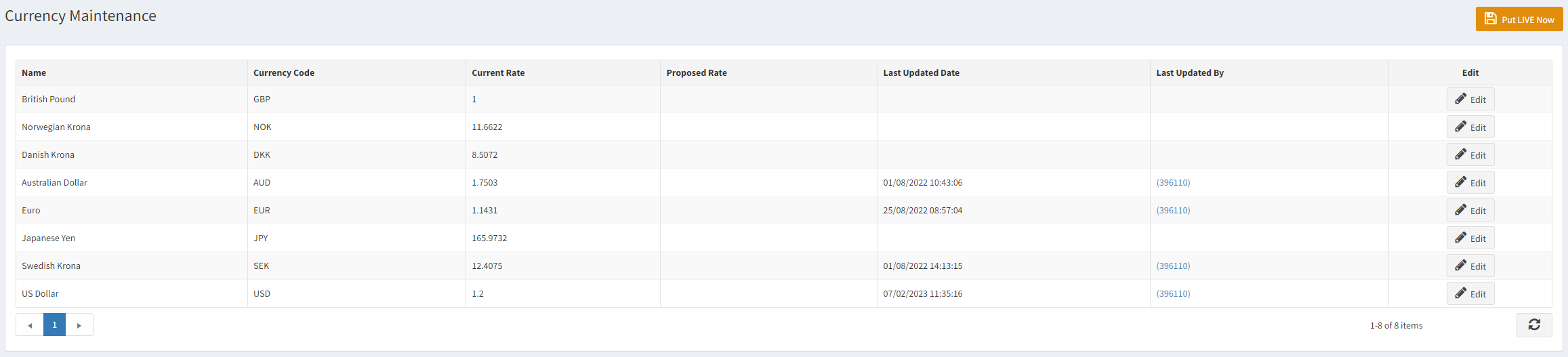
This will display the Currency Maintenance screen, which lists all of the Currencies held on the system and the related Code and Rate. From this screen you can view the current rate for a Currency and you can propose new rates and when ready you can put them live.
Proposing a New Currency Rate
To propose a new Rate for a Currency you can press the “Edit” button against any of the Currency Rates. This will allow you to enter values in the “Proposed Rate” column. From here for that row you can either press “Update” to save the Proposed Rate ready to be put live (NOTE: this wont put the rate live) or you can press “Cancel” which will remove the change you are making. See the example below for when “Edit” is pressed against Euro.

Putting Currency Rates Live
When you have Proposed a new Rate then you will see it within the Proposed Rate column. You can also Propose more than 1 Currency Rate at a time if you wish. When you are ready to put the new rate for the Currency live on the system then press the “Put LIVE Now” button in the top-right corner. Once pressed you will notice a few things from the image below…
- Pricelist Updated – If there are Pricelists in the system which use the Currency Rate which has been updated then a notification at the top will be displayed asking the User to check and ensure the Prices displayed in those Pricelists are still okay and valid. You can quickly see the affected Pricelists by pressing “View Changes”.
- Last Updated Date – This shows the date and time of the last update when the new Currency Rate was put live.
- Last Updated By – This is the User ID of who updated and made the last change to the Currency.
