Store Setup

On Install of new store (IP Addresses)
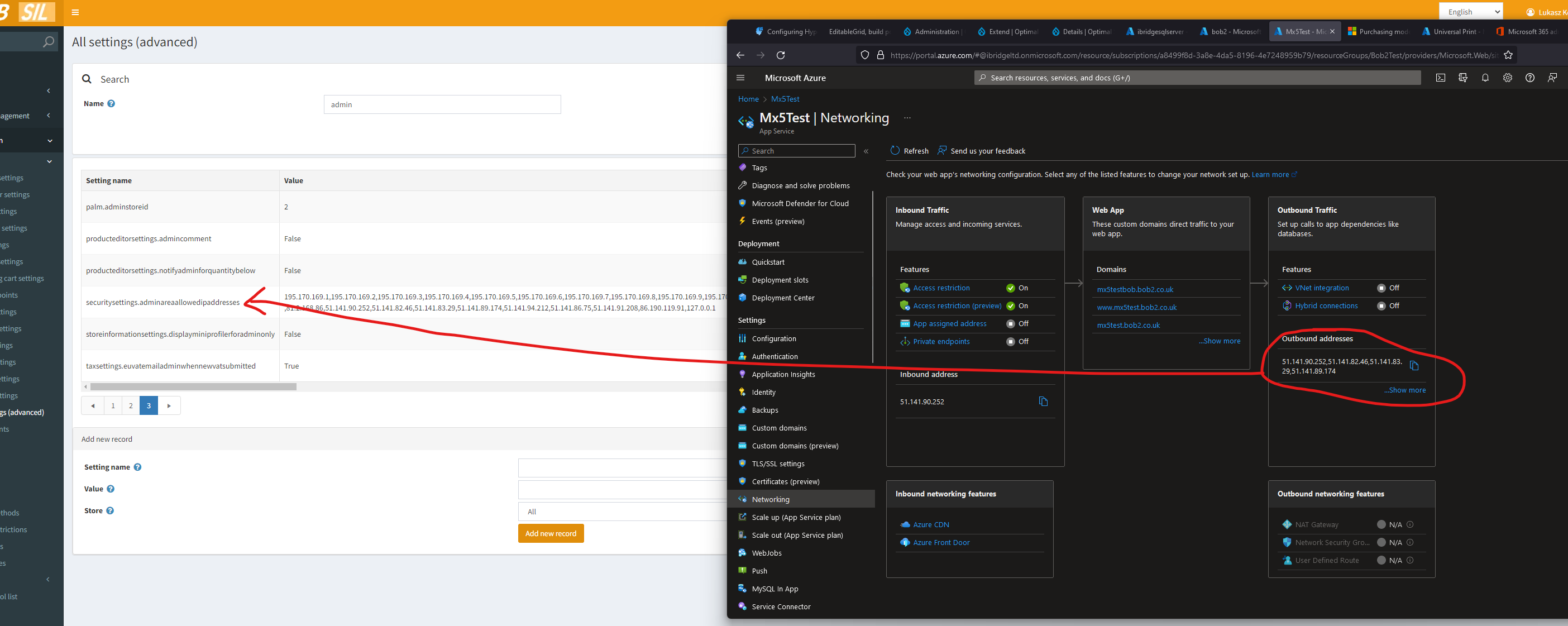
we have to remember to add azure IPs to adminallowedipaddresses when we install new store


Customizing Theme

https://docs.nopcommerce.com/en/developer/design/customizing-theme.html


Product Images

https://www.nopcommerce.com/en/boards/topic/48523/product-images-folder-location


Tax Default on Product Create

taxsettings.defaulttaxcategoryid

--should be  Name=bobtaxsettings.defaulttaxcustomeremail
SELECT TOP 1000 * FROM dbo.Setting WHERE [Value] LIKE '%@%'/*
DELETE FROM Customer WHERE id=4;
SET IDENTITY_INSERT Customer on;
INSERT INTO Customer (Id, Username, Email, EmailToRevalidate, SystemName, BillingAddress_Id, ShippingAddress_Id, CustomerGuid, AdminComment, IsTaxExempt, AffiliateId, VendorId, HasShoppingCartItems, RequireReLogin, FailedLoginAttempts, CannotLoginUntilDateUtc, Active, Deleted, IsSystemAccount, LastIpAddress, CreatedOnUtc, LastLoginDateUtc, LastActivityDateUtc, RegisteredInStoreId) VALUES 
(4, N'[email protected]', N'[email protected]', null, null, 4, 4, N'E07CD9E4-E88D-4028-9DA0-B89580C08605', null, 0, 0, 0, 0, 0, 0, null, 1, 0, 0, null, N'2021-11-04 11:10:29.0766667', null, N'2021-11-04 11:10:29.0766667', 0);
*/UPDATE customer SET Email='[email protected]',  Username='[email protected]'  FROM Customer  WHERE id=4;


Rounding Setting
shoppingcartsettings.roundpricesduringcalculation
UNSET  Ignore “limit per store” rules (sitewide)
DO YOU want to see products or caterory images on sub cat pages???   (eg CarShades)
http://nop43beta.ibridge.local/Admin/Setting/Catalog
Catalog pages  ->  Include products from subcategories
check media settings!!!!  so images get displayed correctly.
I left these at default this time BUT they are different to Azure 4.2 bob2
also NOTE address sequence not in UK format???
http://nop43beta.ibridge.local/Admin/Shipping/EditWarehouse/1
thats because Lukasz coded it in our BOB2 version.
states “Tick the Force SSL for all site Pages to enforce SSL for the entire site. This is useful only when you have SSL enabled on your store details pages.”
also turn on and test them in the store area  https://nop43beta.ibridge.local/Admin/Store/List
base http://nopcommerce.ibridge.local/ should now be ok.  not 100% sure still about the tax setup as i think only UK is correct
see http://docs.nopcommerce.com/display/en/EU+VAT+configuration+guide
WE MUST set   taxsettings.pricesincludetax  = FALSE   then its NET price entry in admin.
setting up standard tax & tax address country will ensure admin uses them to calc Gross prices etc
also on this screen further down.  Ensure shipping in admin is also NET
NOW see  /NOP data/setup-script-4.3-to-4.2-test-data.sql
must check country, VAT, default the correct country and currency

swap USA & UK display order  100, 1  respectively http://nop43beta.ibridge.local/Admin/Country/Edit/82

http://nop43beta.ibridge.local/Admin/Currency/List
edit currency GBP make it primary exchange rate & primary store rate then edit ro mark, published and exchange, rate 1 & display order 1
Image

Image

SET time zone correctly and customer fields
Image
and address setup
Image
ALSO NOTE: to see which page the customer last visited set
Set Store last visited page  = TRUE
to see what IP they were logged in from
Set Store IP addresses  =  TRUE
Under “Checkout” tab, Set
  Use one page checkout   is required
  Check Order totals on payment info tab
  Under Order Totals ->   Auto update order totals  Set to TRUE
  Under  Common  ->  Order ID   set this to NEXT ORDER ID  to use
check  Search autocomplete enabled is ON   –  if required???
check  Catalog pages  ->  Include products from subcategories –  if required  (eg CarShades)
turn on default GDPR system
check news & blog settings.  we turn OFF comments by default and turn the rest on inase anyone sneeks some in
Image
setup default warehousesss
mark sizes & weight defaults & set it to 1.  then update the others
Image
amend all the default info pages and turn off whats not needed
now category lists
default a duff spec item
default a Product Attribute title
any checkout fields needed?
shipping enabled by weight and setup each countrys costs
+ delete any not needed shipping methods from http://nop43beta.ibridge.local/Admin/Shipping/Methods

speed up website settings

unless were changing JS or CSS regularly,  admin -> common -> settings -> general.    tick ALL boxes in minification


Image

&  under localisation  “Load all search engine friendly names on startup”
–  BUT each time you release new products or change their URLs you must remember to clear the cache.
Image
—–
allow access to GTMetrix for speed testing while Azure area is locked down (whitelisted IPs only)?
create an account.  setup user setting to a specific “test server region”
Image

172.255.61.34 – 172.255.61.40

VAT

https://docs.nopcommerce.com/en/getting-started/configure-taxes/index.html

– ensure vat is enabled and setup as per BOB2.co.uk https://bob2.co.uk/Admin/Setting/Tax
– ensure vat provider config is set to by country https://bob2.co.uk/Admin/Tax/Providers
– ensure in providers that VAT levels are all created
– ensure all countries (now since brexit only UK) are selected for VAT
– ensure all products have a VAT assigned

Carriage weights etc
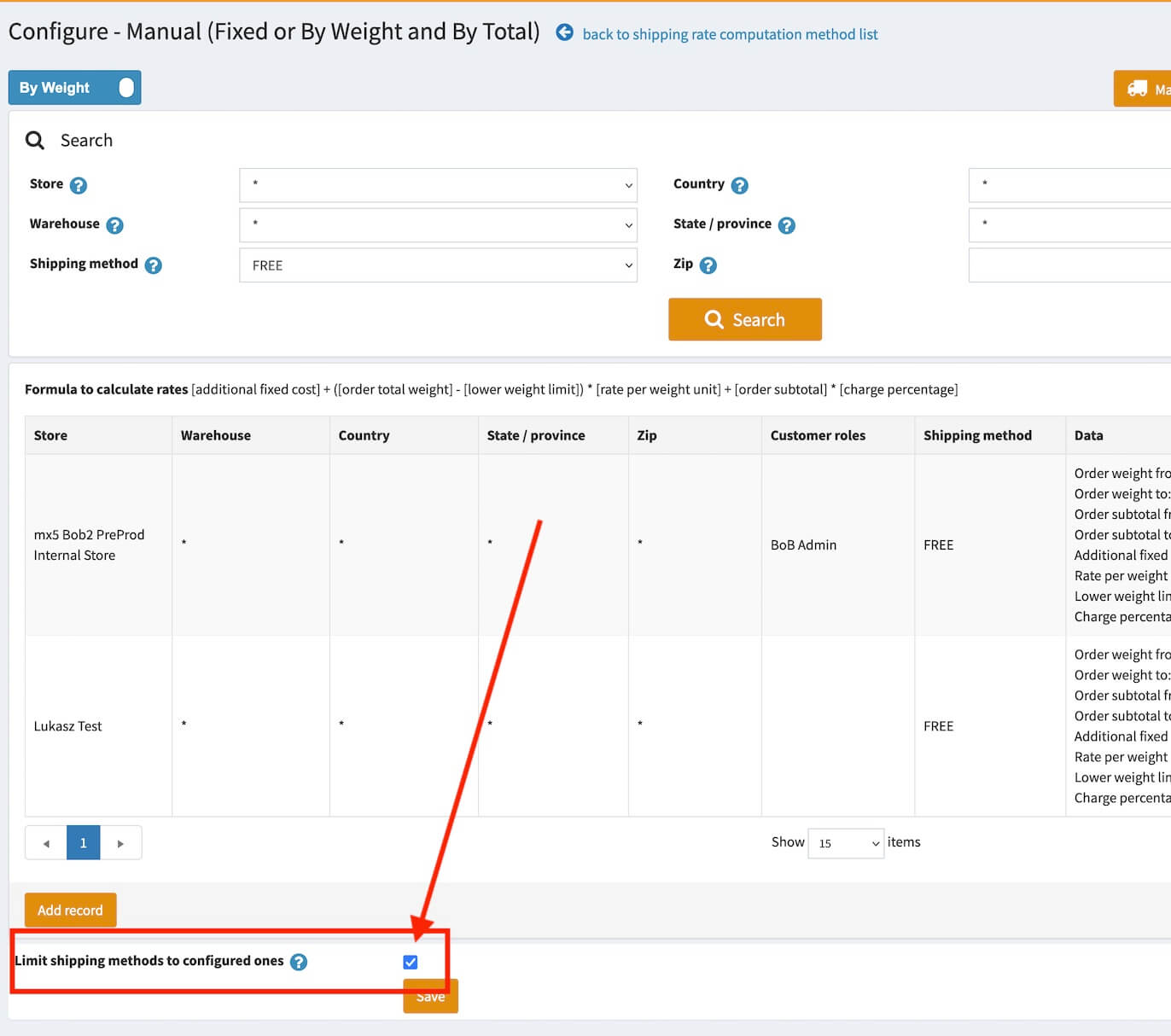
Remember to tick the box toonly show valid zones, also check the country, company & customer roles are the same between system as they are used/saved in ShippingByWeightByTotalRecord
Updated on 2 August 2023

Was this article helpful?

Related Articles

Leave a Comment